Since August, Microsoft has been busy with Copilot and SharePoint updates. Microsoft rebuilt the Copilot app, shipped Copilot in SharePoint, announced a SharePoint team knowledge base, and added new controls in Purview, Entra and Windows. Each one makes AI more useful to your teams. Each one also moves a decision onto your desk. This post walks through the changes in four groups, with dates and links, and ends with a short checklist.
But first there’s more – AI on the PC
One more piece of big news before we get into the rest of this issue. On October 7 in San Francisco, Microsoft and NVIDIA opened pre-orders for two new devices: Surface Laptop Ultra and Surface RTX Spark Dev Box, both built on NVIDIA's RTX Spark Superchip. The specs are serious. The system can be configured with up to 128GB of unified memory, and Microsoft says it can run AI models exceeding 120 billion parameters locally.
The bigger story for you is where the work runs. Microsoft calls it hybrid intelligence: "Copilot will still use the cloud for the hardest tasks, but for times when cost or privacy matter more, it can delegate down to local models that run directly on your computer," said Copilot chief Jacob Andreou. That changes the math on cost, privacy and governance, and it deserves more than a paragraph. I'll cover it in depth in an upcoming issue.
The new unified Copilot app: simpler for users, more decisions for you
One app
On August 18, Microsoft began moving everyone to one Copilot app for personal, work and school accounts. For your tenant, very little changes: a new icon, separate work and personal data, and the same compliance controls. The real benefit is adoption. A good share of "Copilot doesn't work" feedback comes from people who were using the free version with no access to their mail, files or meetings.
Home, Code and Autopilot
On September 25, Microsoft introduced the new Copilot:
· Home brings Chat and Cowork together, with Word, Excel and PowerPoint built in.
· Code lets anyone describe an app, tracker, dashboard or automation and have Copilot build it, in a sandbox that can be hosted inside your tenant.
· Autopilot is a persistent agent that keeps working in Teams and Outlook after you step away.
The pricing split
Microsoft's partner briefing spells out the model. User subscriptions cover everyday Copilot. Usage-based billing covers frontier models and long-running agent work in Cowork, Code and Autopilot. The same briefing notes a December 1, 2026 date for turning usage-based billing on by default for Microsoft 365 Copilot Business licenses.
This is the economics thread I keep coming back to. AI infrastructure is expensive, providers need a return, and the costly parts are moving to metered billing. If your 2027 budget assumes a flat per-seat price and stops there, rebuild it now. The Orion AI maturity assessment is a quick way to see where your governance and ROI tracking stand before usage grows.
SharePoint becomes the destination for AI output
HTML pages in SharePoint
Roadmap ID 569208 lets you create HTML with Copilot in SharePoint, or upload your own, and render it as a page in the Site Pages library. According to message center post MC1479517, public preview began rolling out in early October 2026, and general availability is scheduled to start in mid-November and complete by late December. Pages use existing permissions, and publishing doesn't grant anyone new access.
This closes a gap that's been open for a while. We already had skills that generate a current HTML dashboard on demand. What we didn't have was a native, governed place to put the result.
Copilot in SharePoint is generally available
Copilot in SharePoint began rolling out to general availability on September 30.
Copilot in SharePoint makes the content you already have work harder. Ask it to autofill metadata across a library and it reads every document and fills in the client, contract date or document type. Those columns you set up years ago finally earn their keep. Point it at a project list and you get a live HTML dashboard that updates as the list changes. No export to Excel, no rebuilding the chart every Monday. Ask which pages nobody has opened in six months, which news posts landed, and where your links are broken, and you get a cleanup list instead of a guess. Turn the weekly status update into a skill anyone on the site can run. The payoff is a site that stays fresh, and that matters more than it sounds. Fresh content is what makes AI answers worth trusting.
Three changes matter for planning:
· Everyday work stays in the license. Asking questions and building pages, lists and libraries remain included with Microsoft 365 Copilot.
· Advanced work uses Copilot Credits. Work at scale, scheduled AI automations and real-time Autofill need a spending policy.
· Preview controls expire. The PowerShell cmdlets used during preview are honored until November 1, 2026.
My favorite first project is a one-skill list dashboard: upload a SKILL.md file to the site's Agent Assets library, open Copilot on the list, and ask for an executive dashboard. Anyone with Edit permission on a site can create a skill, so govern SKILL.md files like any other content.
We have HTML dashboard skill files, and many others, published on GitHub as part of our free repository for Copilot skills in Cowork, SharePoint and PowerPoint. Browse what’s available at https://aka.synozur.com/md-skills
Classic pages get an end date
On August 31, Microsoft set the classic SharePoint timeline:
· March 1, 2027: no new classic publishing sites.
· October 1, 2028: classic user-created pages become read-only. Nothing is deleted.
Start with discovery. Purview Audit now logs ClassicPageCreated, ClassicPageEdited and ClassicPageViewed events, and the Microsoft 365 Assessment Tool finds the rest.
Knowledge management in SharePoint for AI
What Microsoft announced
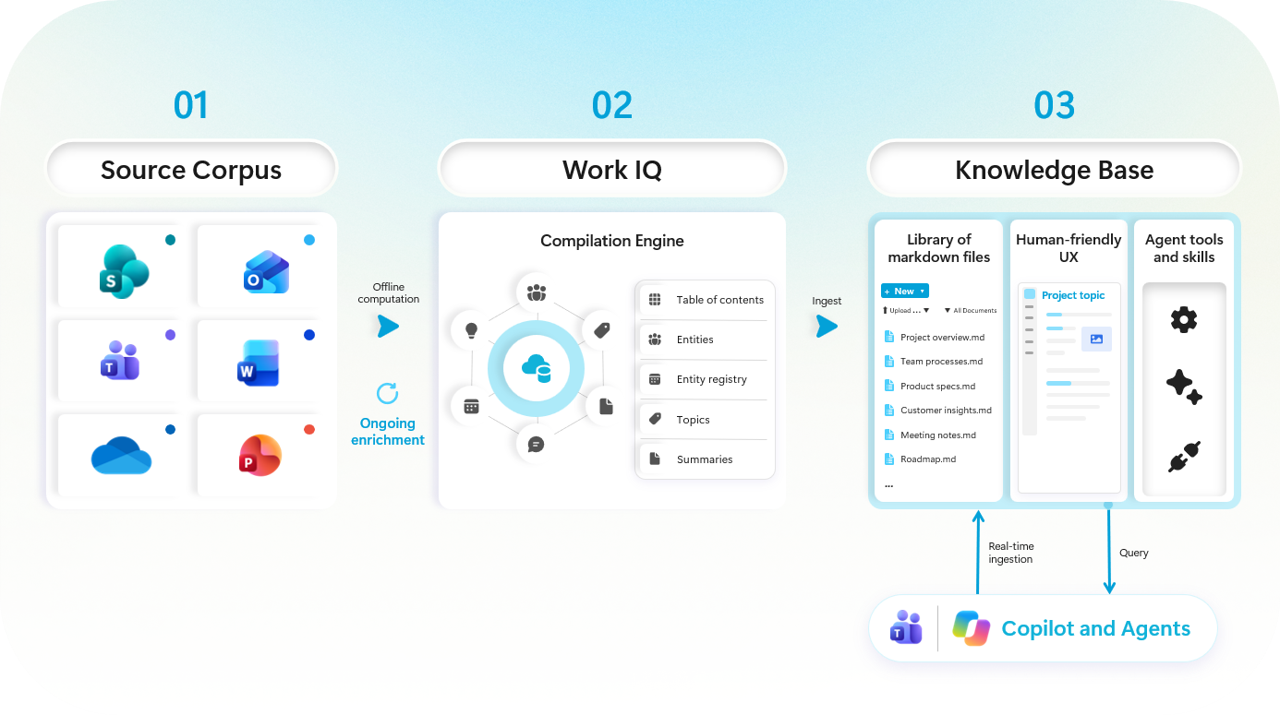
On October 14, Microsoft introduced a team knowledge base in SharePoint. Here is how it works:
· A team chooses the emails, meetings, chats and files that matter.
· Work IQ compiles them into a library of linked markdown pages on a SharePoint site.
· People read and edit the pages, with version history. Agents use the pages as their starting point instead of searching raw files every time.
· Microsoft's internal tests report agent answers up to four times faster and about 30% more token-efficient. Those are Microsoft's numbers, not customer results.
· It's in Frontier preview, and only users enabled for usage-based billing can use it today.
What to watch
Microsoft's support guidance is candid about three points:
· Access widens. Anyone who can read the knowledge base can see content added from a source, even if they can't open that source.
· Pages don't refresh themselves. They update when someone asks Copilot to update them.
· Preview updates can overwrite people. During preview, an update from Copilot or Autopilot can reverse human edits or recreate deleted pages.
Don't wait for general availability to plan for this. Name an owner first. I made the same case in Microsoft Just Took their First Step in KM for AI. We used AI to build topic pages with Project Cortex and Viva Topics too. The pages that lasted had people behind them.
Where Project Copley fits
In August we launched Project Copley, an open, governed knowledge layer that extends Work IQ and works for non-Microsoft agents too. Work IQ handles retrieval. Copley governs what gets retrieved.
It's compatible with Google's Open Knowledge Format and lives on GitHub.
Every concept has a named owner, declared sources, a last-verified date and a stale-after date.
A schema validates the whole bundle in CI, so the structure doesn't drift.
In our SharePoint build, Copley checks that a new library's audience is a subset of every source's audience, and nothing publishes automatically.
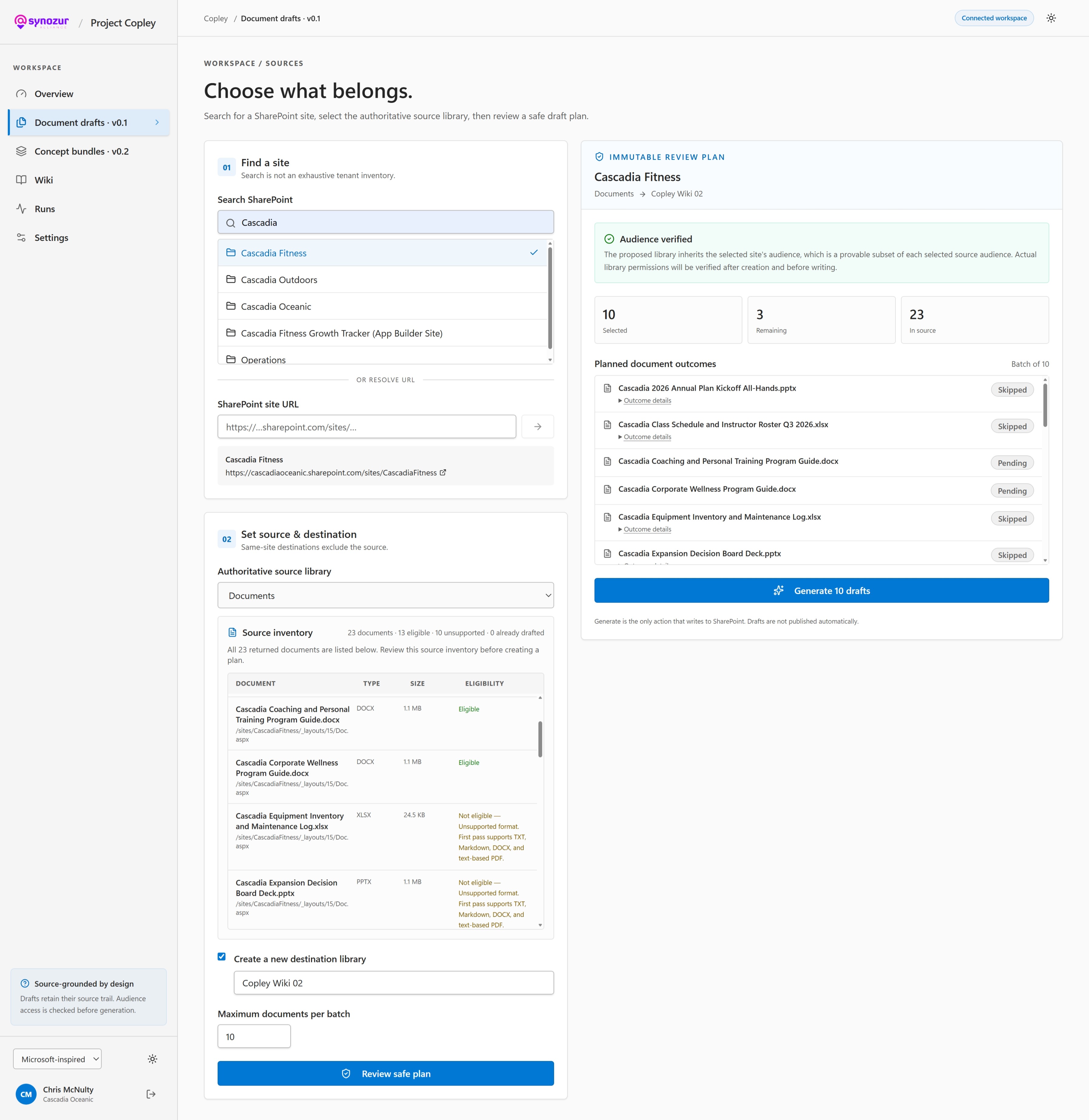
Prototype interface for v0.1 on Project Copley
Our first community call in August was a good start. The next one is coming up November 13 – register here.
Governance: controls move closer to the action
AI experiments and pilots are comparatively easy to control But moving into production with thousands of users and millions of files? That takes more than the same permission sets you’ve been using for the past ten years.

This is a fast moving area for Microsoft. These three updates have all landed since our last newsletter:
More labeling capacity. Purview auto-labeling for SharePoint and OneDrive is rising from 100,000 to 500,000 files per tenant per day, with general availability rolling out in October. More capacity doesn't replace classification design or DLP testing. Content labeling provides addition access control for AI above core security permissions, so you can restrict content for AI without blocking regular collaboration. This is important for deployment at scale.
Network-layer DLP. Purview's integration with Entra Global Secure Access reached general availability in September. It inspects text, files and AI interactions on the network, including traffic to ChatGPT, Gemini and Claude. Purview now also covers Anthropic Claude Enterprise for classification, Insider Risk Management, eDiscovery and more.
Agent containment. Microsoft Execution Containers reached general availability on October 7. IT can define which files and network destinations an agent may use, and Windows enforces it at runtime.
Each of these helps. None of them writes your policy for you. AI accelerates. Experts decide.
The human side
In Knowstalgia, I built on work by Kate Pugh and colleagues to argue for the intangible benefits of considering the human side of information retrieval. Feelings are a powerful accelerant for memory. Knowledge systems should keep stories, examples and pride along with the facts. People remember a hard-won lesson longer than a policy document that was a byproduct of the work.
Your checklist for the next 30 days
· Replace preview PowerShell controls for Copilot in SharePoint with Site AI settings and Restricted Content Discovery before November 1.
· Review every Copilot spending policy, including the setting that adds new services automatically.
· Check guest accounts for your most active external partners before the passcode retirement reaches your tenant.
· Inventory classic pages with Purview Audit and the Microsoft 365 Assessment Tool.
· Choose one team for a knowledge base pilot, with a named owner and a review rhythm.
· Decide who approves Autopilot agents and who can share apps built with Code.
If you want help with any of these, get in touch, and watch for the next Project Copley community call. Thanks and see you soon.