Summer of Copilot Week 3
I’m posting daily series of Copilot updates on LinkedIn – the #SummerOfCopilot series. For the most recent completed week (through June 22) I covered Copilot for Viva Engage; MCP and A2A protocols for AI integration, and upcoming enhancements to Copilot Notebooks. That’s a lot, so let’s get started.
Making Tacit Knowledge Visible with Viva Engage Copilot
Every organization has a goldmine of tacit knowledge: the insights, instincts, and historical context that employees carry in their minds and share only in conversations. Traditionally, when someone leaves or moves teams, that unwritten wisdom is at risk of disappearing. Viva Engage Copilot aims to solve this by capturing the “conversation in the room” and turning it into organizational memory.
Imagine your company’s internal community discussions on Viva Engage (formerly Yammer) about a new strategy or a customer issue. Within hundreds of posts and comments lies valuable feedback and ideas, but no one has time to read it all. Copilot can digest these threads for you. It uses a Large Language Model (LLM) to summarize lengthy conversations and distill the main sentiments and action items. For example, if employees are buzzing about a recent policy change, Copilot could compile the common questions or concerns being raised, giving leadership an instant pulse-check.
Did you know? A landmark study found that around 90% of knowledge in organizations is held in employees’ heads and not formally documented. No wonder capturing tacit knowledge is critical – it’s the majority of what your people know.
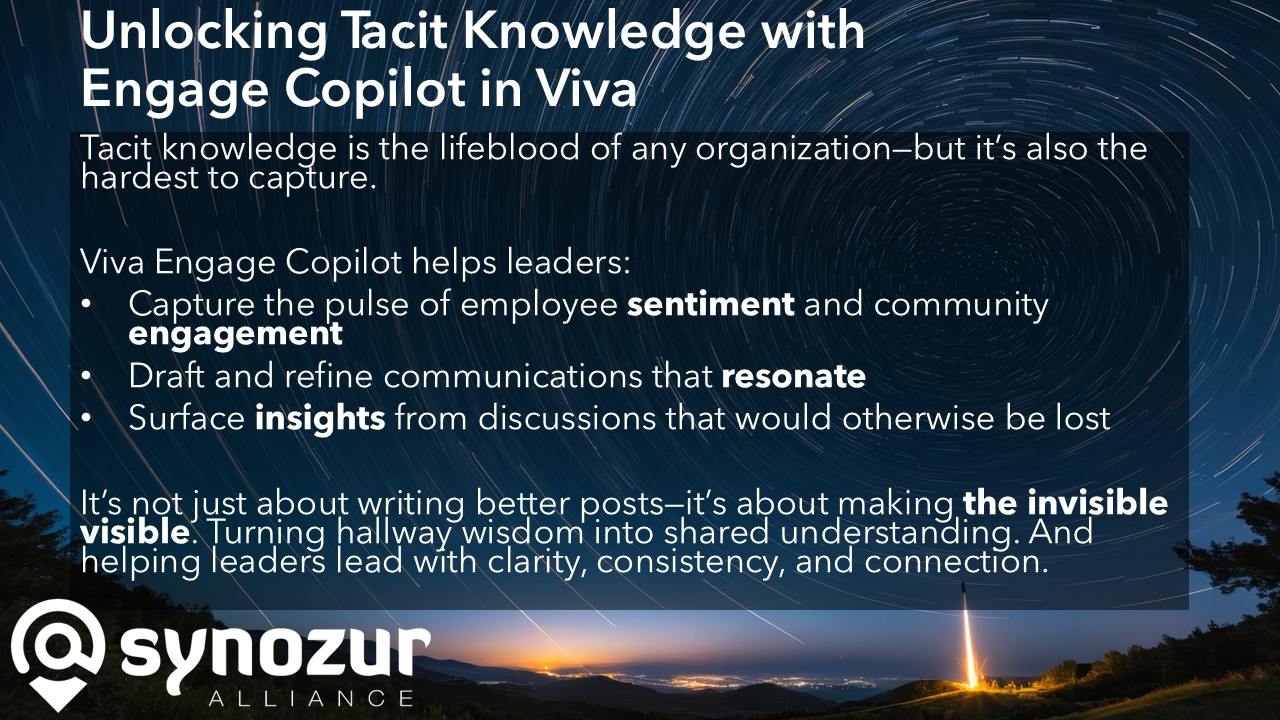
How Engage Copilot unlocks tacit knowledge and strengthens leadership communication:
Pulse of Employee Sentiment: Copilot can summarize how people feel about a topic by analyzing discussion threads. You get a concise readout of morale boosters or pain points. It’s like having a continuous, automated town hall feedback analyzer.
Resonant Messaging: Because it “knows” what’s being discussed, Copilot helps you draft communications that hit the right notes. For instance, if a leader wants to announce a new initiative, Copilot can suggest phrasing that addresses concerns employees have expressed in related conversations. The result is messaging that feels timely and well-informed, boosting trust.
Knowledge Retention: Important insights often surface in Q&A threads or informal chats – which traditionally vanish into scrollback history. Copilot ensures these aren’t lost. It can extract a “lessons learned” summary from a project team’s group conversation or identify an expert’s particularly insightful comment in a long chain. By converting these into shareable summaries, tacit know-how becomes part of the company knowledge base rather than fading away.
What’s next
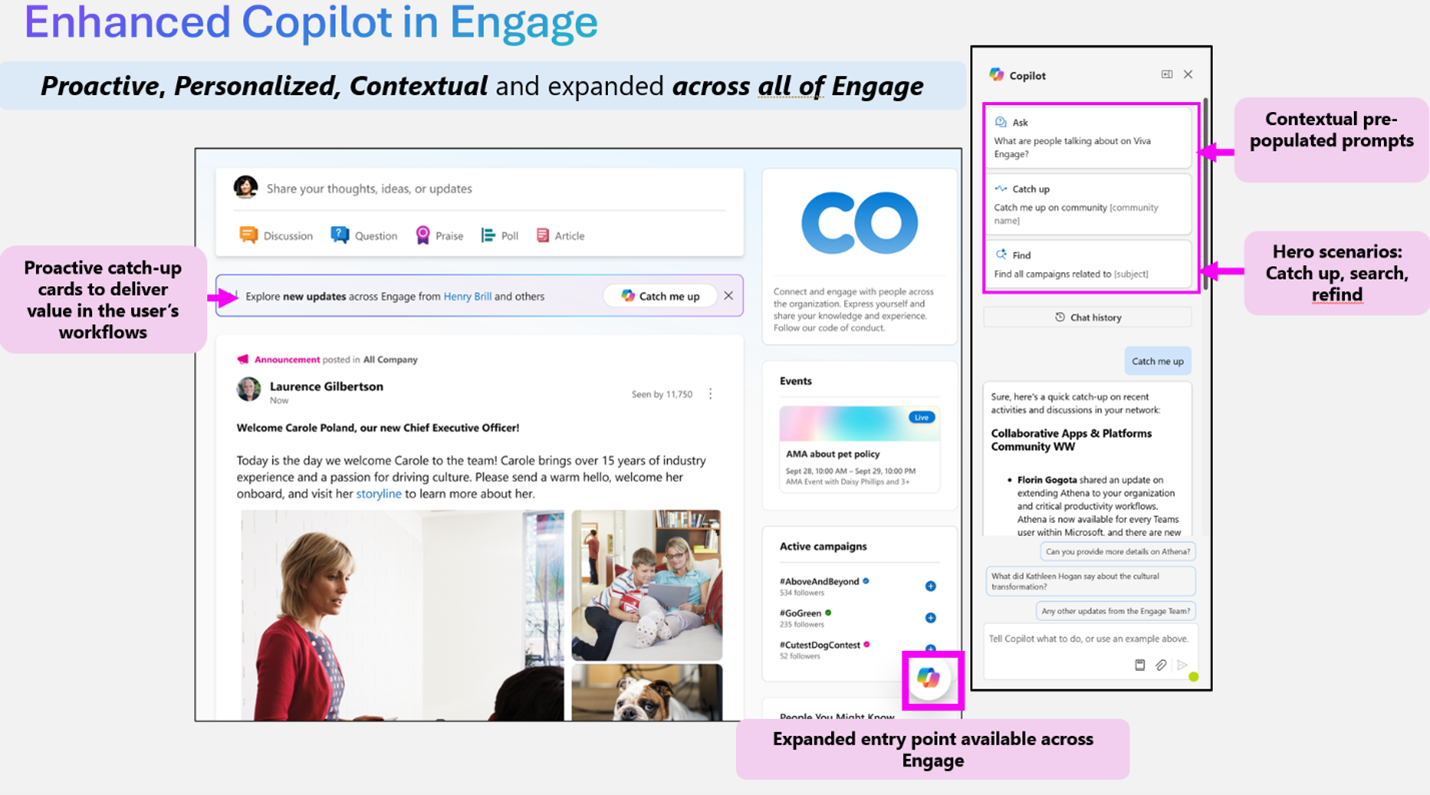
Microsoft has just announced (June 27) three new features coming to Viva Engage communities for Copilot users only:
Community Catch-Up: Stay current on conversations, trending content, and key updates in your network.
Information Discovery: Find relevant insights and answers from colleagues, communities, and storylines.
Recall: Retrieve past conversations, updates, and shared knowledge quickly.
One might worry, does AI summarizing conversations risk missing nuance or misrepresenting people? Microsoft has built Copilot with Responsible AI principles; it’s designed to capture key points without editorializing. Plus, Copilot only works with content users already have access to – it’s not digging into private chats or inaccessible data. Think of it as an assistant who can only summarize the meeting you're allowed to attend. And if there are privacy concerns, administrators can allow employees to opt-out of having their posts included in AI summarization.
For leaders, the value is profound: you can better read the organizational room and respond in an informed way. By making the invisible visible, Engage Copilot helps ensure no good idea or urgent concern stays buried in the conversation feed.
Getting Copilot Up and Running in Viva Engage: What You Need to Know
Deploying an AI assistant across your organization requires planning. Michelle Caldwell, our CEO, recently hosted a webinar on Mastering Your AI Rollout | The Synozur Alliance which is full of practical advice about how to prepare and organize any Copilot pilot and rollout project.
Here’s a step-by-step look: (and more details can be found at Microsoft Learn.)
Licensing and Eligibility:
First, confirm that your users have the required licenses. Copilot in Viva Engage isn’t a free add-on; it’s included in premium Viva Engage licenses – available through the Microsoft Viva Suite or the Viva Employee Communications & Communities package. If your organization already has Viva Suite for your employees, you’re covered. If not, you may need to procure the add-on. Once licensed, Copilot features are enabled by default for those users, meaning technically it’s ready to go as soon as prerequisites are met.
Native Mode Configuration:
Next, ensure your Viva Engage network is in Native Mode. In simple terms, Native Mode means your Engage data is fully integrated with Microsoft 365’s governance (Entra accounts, M365 Groups, compliance boundaries). Most newer tenants are already in Native Mode, but some older Yammer setups might need migration. Without Native Mode, Copilot features won’t activate, since they rely on the unified data model and security framework of Microsoft 365.
Feature Activation and User Experience:
With the above sorted, users will start seeing Copilot entry points in Viva Engage. It’s quite seamless – Copilot appears as a helper when composing a new post or in the sidebar of community pages, storylines, etc. Users might get suggestions like “Ask Copilot to draft a summary” when looking at a long thread, or a Copilot icon in the post composer to get writing assistance. Training is minimal; if someone knows how to use Viva Engage, they’ll discover Copilot just by the prompts and icons introduced.
A2A and MCP – The Future of AI Collaboration
Last year, I predicted the emergence of new standards to integrate AI content sources, and new protocols to allow chatbots to communicate with each other. I called this “Omni AI.” So what does Omni AI look like in 2025?
As you deploy today’s Copilot features, it’s worth looking ahead to how AI will evolve in the workplace. Right now, you might use Copilot in various Microsoft 365 apps – one in Teams meetings, another in Outlook, Viva Engage, etc. In the near future, these assistants won’t operate in isolation. They’ll collaborate with each other and integrate even more deeply with your business data. Two emerging protocols are key to this future: Agent-to-Agent (A2A) and Model Context Protocol (MCP). Let’s unpack them.
Why it matters: In complex organizations, no single system has all the answers. You might have one AI that’s great at scheduling meetings and another specialized in pulling analytics from your ERP. For truly powerful outcomes, these AI agents should be able to talk to each other and tap into all relevant data. A2A and MCP address these needs, respectively.
A2A vs MCP at a Glance
To make the distinction clear, here’s a comparison of A2A and MCP:
Feature | A2A (Agent2Agent) | MCP (Model Context Protocol) |
Origin | Co-developed by Microsoft & Google as an open standard | Developed by Anthropic as an open integration standard |
Primary Focus | Facilitating agent-to-agent collaboration across platforms | Enabling agent-to-tool/data integration (connecting AI to external systems) |
Architecture | Peer-to-peer, publish/subscribe model for messaging between agents | Client-server plugin model – AI agents act as clients calling data/service plugins on servers |
Use Case | Multi-agent workflows and orchestration (e.g., one agent delegates a task to another) | Secure access to databases, APIs, legacy tools by standardizing connectors |
Latency Optimization | Optimized message routing (e.g. via Azure’s messaging backbone) for low-latency agent interactions | Caching of plugin responses and query optimization to efficiently retrieve context data |
Copilot’s Role | Allows Copilot to delegate tasks to other AI agents (Copilot-to-Copilot communication) for complex tasks | Powers Copilot’s grounding and tool invocation – fetching real-time enterprise data to support answers |
Visibility | High – users may observe AI agents coordinating or handing off tasks (front-end behavior) | Low – operates in the background, invisible to end-users (back-end infrastructure) |
A2A is about breadth of collaboration, whereas MCP is about depth of knowledge:
A2A means your digital assistant isn’t an only child; it can have productive “conversations” with other assistants. For example, if you ask a future Copilot to organize an event, it could use A2A to enlist a scheduling agent, a travel-booking agent, and a budget-checking agent, all working together across different systems and companies. Microsoft’s integration of A2A into its ecosystem is already underway – they announced in May 2025 that Azure AI Foundry and Copilot Studio (tools for building AI solutions) now support A2A, and joined the open-source A2A working group to further this standard.
MCP, on the other hand, ensures that when your Copilot (or any AI) is working on a task, it has a direct line into the data it needs. Rather than training huge models on every possible document (which is impossible), the AI can query a system in real time. Think of MCP as the “data plumbing” that connects AI brains to company data. Anthropic introduced MCP with that exact goal: to replace bespoke, one-off integrations with a universal pipeline. Microsoft’s adoption of MCP in Copilot Studio means those building Copilot extensions can use a ready-made standard to hook into external info.
Real-world scenario with both in play: Consider an employee asking, “Copilot, help close this Q3 sales deal.” In the background, an A2A-enabled Copilot might coordinate between multiple agents – one that drafts the proposal, one that checks inventory and delivery timelines, and one that reviews the legal terms. Meanwhile, thanks to MCP, each of those agents can securely pull up-to-the-minute data: the inventory agent queries the supply database for stock levels, the proposal agent fetches past proposals from SharePoint, and the legal agent grabs the latest contract template from an ERP. The employee receives a coherent, informed response because the AI agents collaborated and drew from live data sources.
This future is quickly becoming reality. Google unveiled A2A in April 2025 as an open protocol, and within a month Microsoft embraced it fully. Anthropic’s MCP was released in late 2024 and has quickly gained support from Microsoft, Google, and OpenAI. Industry analysts foresee these protocols as fundamental for “agentic” AI systems in enterprise environments.
It’s worth noting, these advances will happen mostly under the hood. As a leader, you might not need to configure A2A or MCP yourself – they’ll be baked into the tools you use. But you will notice their effects: Copilot getting smarter, more connected, and more capable of complex assistance.
Microsoft’s vision is clear from their statements: “The best agents won’t live in one app or cloud; they’ll operate in the flow of work, spanning models, domains, and ecosystems.” In other words, the future of Copilot is not a solitary AI but a cooperative network of AIs working alongside us.
Microsoft already provides its Graph Connectors to break down data silos and bring hundreds of external sources into scope for the Microsoft Graph and Copilot. Graph Connectors are powerful, but over time, MCP-based approaches will allow more complex scenarios (e.g., bringing M365 data into other AI systems beyond Copilot.)
Bridging Ideation and Execution: Copilot Notebook’s New Tricks
We’ve looked at how Copilot captures knowledge and coordinates with others, but there’s another piece of the productivity puzzle being addressed: the gap between brainstorming ideas and producing polished outputs. Many leaders live in their OneNote or other note-taking apps – collecting thoughts, meeting notes, rough plans. Translating those raw notes into something like a proposal deck, a FAQ for customers, or an executive brief is often a manual, time-consuming step.

Earlier this year, Microsoft released Copilot Notebooks, which allow you to connect related chats, source documents, and outputs into a single workspace, with the ability to generate audio summaries about them. It’s already helpful, and there’s a big road map coming. (See: Introducing Microsoft Copilot Notebooks – A Quick Take) For example, Copilot Notebooks were recently integrated into OneNote, giving users an AI-powered workspace within OneNote to gather content and ask questions about it. You can load up reference files, notes, and context, and have Copilot help summarize or extract insights.
Enter Microsoft 365 Copilot Notebook’s latest evolution. Announced for July 2025, two new features will allow one-click generation of entire FAQ pages and briefing documents directly from your Copilot Notebook content.
FAQ Pages: With one click, Copilot will create a Q&A style page from your notes. This is extremely handy for scenarios like product launches or policy updates – any case where people will have lots of questions. Instead of manually writing out all those questions and answers, you let the AI compile them from the source material you’ve assembled in the notebook. It can identify common queries and answer them based on your notes.
Briefing Documents: Similarly, Copilot can generate a narrative brief or summary document out of a notebook. For instance, say you’ve been using a Copilot Notebook to organize a new strategy outline – you have customer research, SWOT analysis, and key objectives gathered. You hit “generate briefing,” and Copilot produces a formatted document that lays out the strategy for easy reading, complete with headings and key points drawn from your content.
Why this matters for business leaders:
Accelerated Decision Support: Time is often the enemy when you need to get everyone on the same page. These features turn your rough notes into structured insights or guidance in moments, speeding up how quickly you can inform your team or decision-makers. A brainstorming session in the morning could become a polished brief by the afternoon with minimal additional work.
Consistency and Clarity: Humans writing summaries from notes can be inconsistent – we might overlook a point or frame things differently each time. Copilot’s approach will be consistent in pulling out the key information. It’s like having a diligent editor who ensures nothing important slips through. The output FAQs or briefs are also standardized, which helps readers digest information faster.
Efficiency Gains: Perhaps most obviously, this saves labor. Your time (or your staff’s time) can be redirected from low-value tasks (formatting documents, copy-pasting Q&As) to higher-level thinking. It’s an example of AI not replacing the human, but taking on the grunt work so the human can focus on strategy and decisions.
Microsoft is tracking these updates for release in July 2025 under roadmap IDs 497133 (FAQ generation) and 497134 (briefing generation).
In conclusion, it’s an exciting time to be at the intersection of business leadership and technology. AI tools like Copilot are not just shiny new apps – they’re becoming integrated colleagues, augmenting how we share knowledge, make decisions, and get work done. As a leader, embracing these capabilities can lead to more informed teams, faster execution, and a stronger ability to adapt in the competitive landscape.
Your organization’s knowledge, both explicit and tacit, is its lifeblood. With Copilot and its evolving ecosystem, you have a growing set of instruments to capture that knowledge, amplify it, and act on it with unprecedented efficiency. The invisible is becoming visible; the asynchronous is becoming unified. In the months ahead, keep an eye on how these AI developments unfold – those who learn to leverage them early will shape the future of work for everyone else.
Thank you for reading! If you found this deep dive useful, stay tuned for more insights and updates in future installments. And as always, I welcome your thoughts – how do you see Copilot changing your way of working? Feel free to reach out or comment with your perspective. Let’s navigate this new era of AI-powered productivity together.