Upgrades You Shouldn’t Miss
The #SummerOfCopilot series rolls on – now in week ten on LinkedIn. I’ve been summarizing all those posts in my weekly Copilot Navigator newsletter, with a deeper dive here in the Insights blog.

Recently, we’ve spent a couple of weeks looking at some Copilot in real world scenarios – the subject of the next blog post and newsletter. In the meantime, I’m sharing recent updates to the Copilot roadmap.
#SummerOfCopilot Week 10 Blog Posts
Week 1: Trends and Insights from Microsoft’s Latest AI Innovations
Week 2: First Encounters with Microsoft’s Copilot Researcher & Analyst
Week 3: From Tacit Knowledge to Talking Agents: Navigating Copilot’s Next Evolution
Week 4: Copilot Goes Ubiquitous – Agents plus Copilot training resources
Week 5: Co-Piloting the Future – Custom AI Agents with Enterprise Control
Week 6: AI in Action: How New Copilot Features are Changing Content Management and Productivity
Week 8: Driving Productivity: Copilot from Driver’s Seat to Board Seat
Week 9: Copilot for Every Leader: How AI is Empowering the C-Suite
Our next few posts:
Week 11: Copilot in the Real World (customer success stories)
Week 12: User Tips, Tricks and Best Practices
Week 13: Copilot State of The Union – Looking Backward, Looking Forward
Earlier this month, Microsoft introduced GPT‑5 in Microsoft 365 Copilot, enabling smarter, context‑aware routing between fast responses and deep reasoning.
Alongside that milestone, four roadmap updates can accelerate how decisions, meetings, email, and mobility work at scale:
PowerPoint from a Copilot Page (ID 499425; Aug CY2025),
Teams recap to SharePoint News (ID 498494; Sep CY2025 Preview),
Copilot Chat email attachment summarization (ID 499657; Sep CY2025 GA)
Voice chat for Copilot on mobile (rolling out July–Sept 2025).
If you lead teams, this is a practical moment to reduce swivel‑chair work, improve knowledge flow, and bring AI closer to where people actually operate.
The signal: GPT‑5 inside Copilot
Microsoft’s announcement highlights a dual‑mode approach: speed for routine asks and deeper reasoning for complex prompts — automatically chosen per request. In real terms, your sales lead can get a quick cross‑project status in seconds, while your strategy chief can request a defensible analysis with context from documents, chats, meetings, and mail. without re‑prompting. It’s a meaningful quality lift, not just a model version bump.
 news.microsoft.com
Four near‑term upgrades to operationalize now
Generate PowerPoints grounded in a Copilot Page
Roadmap ID 499425 | Rollout start: August CY2025
Copilot uses Loop to capture shareable, editable outputs that you can add to notebooks, convert to Word or embed in other documents. These outputs are saved as Copilot Pages — a single place where context, facts, and links live.
Generating PowerPoint from a prompt or a Word document (with the proper templates and organizational assets) is like magic the first time people see it.

However, if you’ve been doing extended research, you may have more material than can fit in the current 800-character limit for a PowerPoint Copilot prompt. That’s where Loop comes in. It’s simple to save your Copilot research as a Loop (pages), and then just reference it when you’re building a PowerPoint without needing to crunch it down to 800 characters.
Leader takeaway: Standardize your “source of truth” pages. The more clear, current, and permissioned your Copilot Pages are, the better your decks—and the fewer hours spent polishing them.
Publish Teams recap → SharePoint News
Roadmap ID 498494 | Rollout start: September CY2025 (Preview)
Organizers and presenters can share recap notes and follow‑ups directly to SharePoint News, where they’re discoverable, subscribable, and available for Copilot grounding. SharePoint news has many advantages – it’s a rich visual canvas that lends itself to easy navigation and one click email publishing.

Leader takeaway: Make “publish the recap” a standard closing step. Tie it to your OKRs: decisions, owners, and dates should be one scroll away for anyone who needs them.
Copilot Chat summarizes Outlook attachments
Roadmap ID 499657 | Rollout start: September CY2025 (GA)
Copilot Chat can now summarize modern attachments (Word, Excel, PowerPoint, PDF, text, JSON, XML) and item attachments (like email threads) referenced in the message—without opening each file. Leaders can prioritize quickly and ask follow‑ups in‑line.
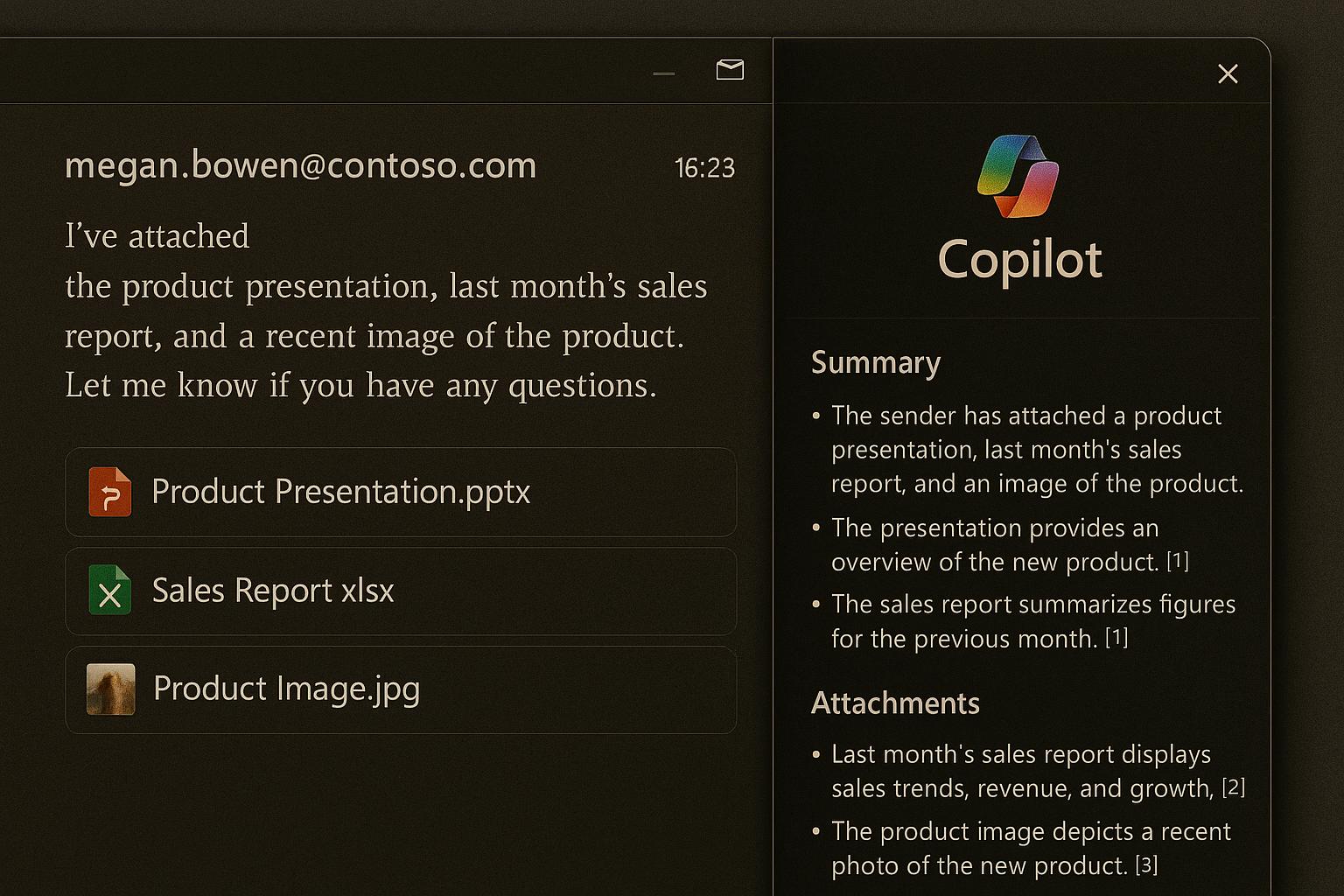
Leader takeaway: This seems kinda obvious, right? Copilot excels at wading through long deep email threads, so it’s great to be able to bring the same capability to those emails with 10 attachments so you don’t have to open up each one to find out if you need it.
Voice chat in Microsoft 365 Copilot (mobile)
Rollout start: early July 2025; completing by early September 2025
Real‑time voice chat is rolling out for the Microsoft 365 Copilot app, enabling natural, interruptible conversations while you’re on the move—ideal for field leaders, site visits, or travel days. [Message Center summary] and July What’s New recap note this capability and related enhancements (e.g., conversation history and grounding).
Leader takeaway: Add “voice prompts” to your playbook. For example: “Summarize my last three client notes and generate three follow‑up questions for tomorrow’s call.”
Get value faster
Data hygiene is strategy. Every one of these features benefits from well‑organized, permission‑trimmed content. Consider a 30‑day sprint to clean up critical workspaces and set clear owners for Copilot Pages.
Codify the “last mile.” Build micro‑rituals: publish recaps; tag owners and dates; use a one‑line goal in emails; record key decisions where Copilot can find them.
Skill up with purpose. Introduce GPT‑5’s strengths (better routing, deeper reasoning) with task‑based prompts your teams run weekly—not abstract demos.
Measure adoption visibly. Add a leader dashboard: how many recaps published, % of meetings with action owners, time‑to‑deck for QBRs, and Copilot usage by function.
What we’re watching next
How GPT‑5 influences Copilot’s consistency—fewer edge‑case misses, more trustworthy drafts.
The interplay between SharePoint News and Copilot grounding — will published recaps dramatically improve answer quality?
Attachment summarization across regulated content — expect clear guardrails on MIP‑protected files.
Voice experiences beyond mobile — hands‑free in meetings and on devices at the edge.
Thanks for reading and stay tuned for more Copilot news.