Microsoft’s new Purview Data Loss Prevention (DLP) adaptive scopes for SharePoint have quietly introduced a pivotal capability for enterprise AI governance.
This update – currently in preview (generally available by March 2026) – enables organizations to dynamically and automatically control which SharePoint content Microsoft 365 Copilot can access, based on policy-driven rules rather than static manual lists. It’s a significant shift that empowers business and IT leaders to govern AI at scale, finally bridging a major gap that has limited safe enterprise adoption of AI assistants.
Why This Update Matters
Every day, users add nearly 3 billion files to SharePoint. It’s the world’s #1 data source for enterprise AI. Content qualty and security is AI quality.
Until now, Copilot governance in large organizations often meant choosing between two extremes: either over-restrict Copilot’s access to data, undermining its usefulness, or leave it broadly enabled with manual safeguards, risking that sensitive data might slip through. Previously, Microsoft’s guidance for mitigating risk was to use blunt instruments like a “Restricted Sites” allowlist – essentially turning off Copilot’s ability to search all but a short list (maximum 100) of SharePoint sites. This approach was brittle and hard to scale: maintaining site lists by hand doesn’t keep up with the rapid growth of content, and a 100-site limit is impractical in large enterprises.
In the SharePoint Admin Center, that property is here. Its not visible within site settings.
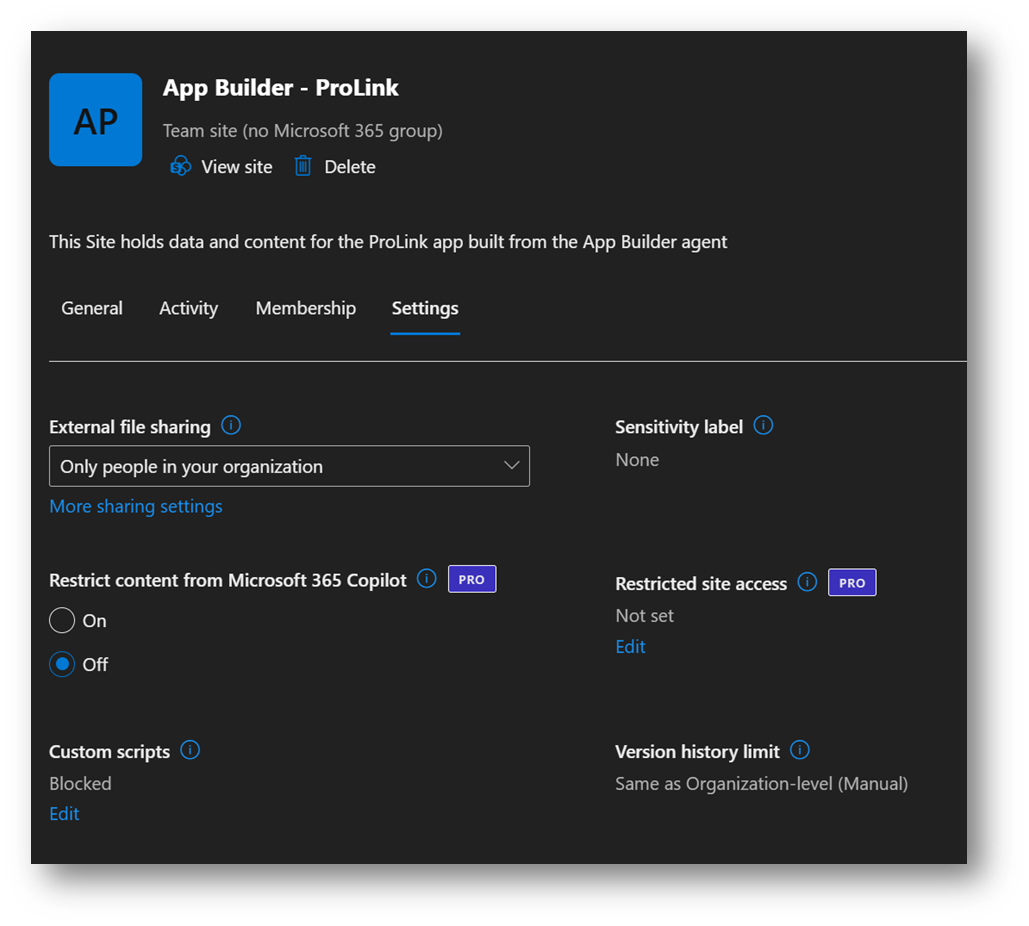
Additionally, the Restricted Sites Copilot control today removes content on selected sites from search. This limits Copilot’s ability to work with content at scale through the WorkIQ (Microsoft Graph) semantic layer, but doesn’t stop users from uploading content in those sites directly to a Copilot chat.
Purview Adaptive DLP for SharePoint changes the game. Instead of managing static lists, security and compliance teams can now create adaptive policies in Microsoft Purview that continuously evaluate SharePoint site attributes (such as names, metadata, sensitivity labels, or other classifications) and automatically include or exclude sites from Copilot’s reach.
In practice, this means you could, for example, instantly prevent Copilot from ever using content on any SharePoint site marked “Confidential” as soon as that label or property is applied, without waiting for an admin to update a list. The moment a new sensitive project site is created or an existing site’s status changes, the DLP policy will adjust in real-time to enforce your rules. This eliminates the 100-site limit and the need for constant manual updates, ushering in a governance model that adapts as your content landscape changes.
Impact on Copilot’s Knowledge Access: Microsoft 365 Copilot is designed to only retrieve and summarize content that an authorized user already has access to – typically drawing from emails, chats, meeting notes, and especially documents stored in SharePoint and OneDrive. These platforms serve as the primary knowledge repositories for most organizations, and by default Copilot’s enterprise search can span all SharePoint sites and OneDrive content the user can access. Therefore, improving governance in SharePoint has a direct, broad impact on Copilot’s utility and safety.
With adaptive DLP controls, if certain content or entire sites are deemed too sensitive or inappropriate for AI consumption, policies can block Copilot from ever seeing or using that information. In fact, Purview DLP now provides a dedicated “Microsoft 365 Copilot and Copilot Chat” policy scope, so you can define rules (for instance, based on sensitivity labels) that stop Copilot from processing or returning specific content in its responses. This reduces the chance of “Why did Copilot surface that document?” surprises, because you’re proactively defining what’s off-limits.
How to use adaptive scopes
Admins set a new property in the “property bag” for each site or group in SharePoint – “AI: Restricted”, “Policy: Top Secret”, “Copilot: Approved” – and then decide whether you want to exclude sites marked as Top Secret – or only include sites that have an approved property (this keeps all sites out of Copilot scope until you explicitly tag them.) Setting the orperties is simple using a PowerShell script, or even a custom app (pretty simple for vibecoding.)
Why SharePoint’s Role Is Central: It’s not branded as a “Copilot feature,” but this SharePoint-targeted DLP enhancement gets to the heart of AI governance because SharePoint is where a huge portion of enterprise knowledge resides. Every improvement to how you govern SharePoint content essentially improves Copilot’s guardrails across the board.
By leveraging adaptive scopes in Purview DLP, a compliance officer can ensure, for example, that any SharePoint site with certain keywords or a “Top-Secret” classification is automatically out-of-bounds for Copilot. Since Copilot’s effectiveness comes from mining corporate data, these controls offer a way to fine-tune the scope of AI knowledge in line with business policies. The result is an AI assistant that can be unleashed on vast swaths of your data to drive productivity – while confidently preventing exposure of regulated or highly sensitive information.
The Strategic Takeaway: Microsoft’s adaptive DLP for SharePoint may sound like an IT admin update, but it is fundamentally a strategic enabler for AI-powered organizations. It provides a blueprint for scalable AI governance: using policy-driven automation instead of manual settings, and continuously aligning AI’s data access with business objectives and compliance requirements.
In short, Copilot governance is no longer a missing piece, but a built-in, adaptive function of your data strategy. Leaders who recognize this can shift from debating “Copilot: yes or no?” toward confidently asking, “How do we operationalize AI with the right governance so it can run safely at full speed?”
References:
Microsoft 365 Roadmap – “Data Loss Prevention: Adaptive Scopes for DLP for SharePoint” (Feature ID 549288, Preview Fen 2026)
Microsoft 365 Copilot data protection architecture | Microsoft Learn (official documentation on using DLP policies to control Copilot’s data usage)
Learn about using Microsoft Purview Data Loss Prevention to protect interactions with Microsoft 365 Copilot and Copilot Chat | Microsoft Learn (explains default Copilot access to SharePoint & OneDrive content and new governance controls)